Introduction
Have you ever seen the same company listed three different ways in one spreadsheet? Maybe you saw “HP”, “Hewlett Packard” and “Hewlett-Packard” side by side. To a person, they look like one brand. To a computer, they look like three different companies. This small problem can make reports wrong, split your customer data, and waste a lot of time. Brand name normalization rules fix it. They give you a clear plan to write every brand name the same way, every time. In this guide, you will learn what these rules are, why they matter, and how to use them in seven easy steps. You will also see real examples, common mistakes, and answers to the questions people ask most.
What Brand Name Normalization Rules Mean
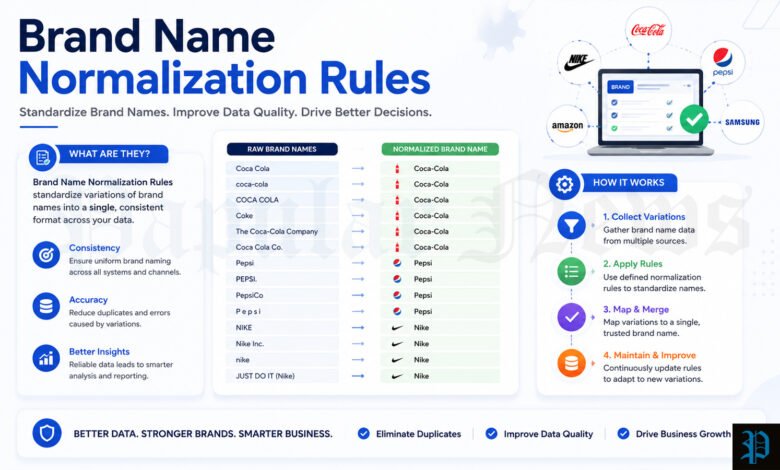
Brand name normalization is the process of choosing one clean version of a brand name and using it everywhere. The goal is simple: same brand, same name. It does not mean you change the brand into something new. You only clean up the way the name is written, so it looks the same in your database, your website, and your reports.
The “rules” are the written steps you follow to do this. For example, one rule might say, “Remove extra spaces.” Another might say, “Write all names in title case.” When you put these rules in order and use them every time, your data stays tidy. Data teams at companies such as Openprise and Databar use this same idea to keep customer and company records clean. Many online stores and marketing teams use it too.
Why Brand Names Get Messy
Brand names look messy for many simple reasons. People type them by hand, and everyone types a little differently. One person writes “Acme Inc.” and another writes “ACME INC” or “Acme, Inc”. Data also comes from many places, such as web forms, spreadsheets, sales tools, and online shops. Each place has its own habits.
Computer files add more trouble. A CSV file can bring in hidden spaces, extra quotation marks, or odd symbols. A name with a space at the end will not match the same name without one. You cannot see this problem with your eyes, but the computer sees it right away. Short forms also cause trouble. A brand like “H & M” might appear as “H&M” or “h m”. All three point to the same store, yet they sit in your data as three different names.
Why Clean Brand Names Matter
Clean brand names make your work easier in many ways. First, they stop duplicate records. If one brand appears five times, your sales numbers get split into five small pieces. When you fix the names, the pieces come together, and you see the real total.
Second, clean names help search and filters. Imagine an online shop where shoppers filter products by brand. If “Nike” and “Nike, Inc.” are listed as two brands, the shopper sees two filter choices. That looks confusing and can lose sales. Third, clean names help reports. A manager who wants to see sales by brand can trust the numbers when every name is written once. Fourth, clean names help marketing. Teams can group customers better, send the right message, and track results with less guessing. In short, a small amount of cleaning saves a lot of work later.
Where You Can Use These Rules
You can use brand name normalization in many jobs. Here are the most common ones.
- Customer records (CRM): Sales teams keep lists of companies. Clean names stop two reps from calling the same company by mistake.
- Online stores and product feeds: Shops with many products need one spelling for each brand so filters and search pages work well.
- Reports and analytics: Analysts need the same name in every data source so totals are correct.
- Local SEO: Local search depends on a steady name, address, and phone number across the web. A steady brand name helps search engines trust your listings.
- Brand monitoring: Teams that track mentions of a brand need to catch every spelling of the name.
The idea is the same in each case. You pick one standard form, and you map every messy version to it.
Before You Start: Keep the Original Name
Before you change anything, make a safe copy of your data. This is the most important habit in the whole process. Experts at Datablist suggest keeping the original names in one column and writing the cleaned names in a new column. That way, you can always check what the source said.
There is a good reason for this. A cleaned name is not the same as a legal name. You still need the full registered name for contracts, invoices, and identity checks. If you overwrite the original, you lose it forever. Also, rules sometimes make mistakes. When you keep the first version, you can undo a bad change in seconds. Treat the original as your backup, and never throw it away.
Clean Extra Spaces and Stray Symbols
The first step is the easiest, and it fixes many problems at once. Remove extra spaces and strange symbols from every name. Here are the small jobs inside this step.
- Trim spaces at the start and end of the name.
- Turn double spaces into single spaces.
- Remove tabs and line breaks that came from imports.
- Delete symbols that do not belong, such as @ or !.
- Remove stray quotation marks from CSV files.
For example, “Acme@Solutions!” becomes “Acme Solutions”. Also, “Acme Solutions” with three spaces becomes “Acme Solutions” with one.
Run this step before anything else. If you skip it, later steps can fail. A name with a hidden space may not match your master list, even if the letters are perfect. In a spreadsheet, you can use the TRIM function to remove extra spaces fast. Be careful with symbols, though. Some brand names use them on purpose. “AT&T” needs its ampersand, and “Yahoo!” has used an exclamation mark in its name. Remove only the symbols that are clearly noise.
Fix Capital Letters the Smart Way
The second step is to pick one style for capital letters. Most teams choose title case for display, such as “Johnson & Johnson”. Many also use lowercase versions behind the scenes for matching, because computers then ignore case differences.
A simple rule is to change ALL CAPS names to title case. For example, “ACME SOLUTIONS” becomes “Acme Solutions”. Some teams also add a short-name rule. Names with fewer than four letters, such as IBM or 3M, stay in full capitals. So “ibm” becomes “IBM”.
Watch out for brands with special styles. A blanket rule can break names like eBay or iPhone. If your tool changes them to “Ebay” or “Iphone”, the brand owner would not be happy. The fix is a short exception list. Write down every brand that has fixed capital letters, and let the rule skip them. In a spreadsheet, the PROPER function makes each word start with a capital letter. It is fast, but it will also change “eBay”, so check the results with care.
Handle Legal Endings Like Inc and LLC
The third step deals with legal endings. These are words such as Inc, Corp, LLC, Ltd, GmbH, and SA. They show the legal form of a company. For most daily work, they only add noise. So many teams remove them. For example, “HubSpot LLC” becomes “HubSpot”, and “Symantec Corporation” becomes “Symantec”.
First, ask yourself where the data will go. Datablist points out that the answer depends on your goal. Outreach lists often work better without legal endings. Legal billing and contracts, however, may need the full name. You can solve this by keeping two fields. One holds the short brand name, and the other holds the full legal name.
Some brands have legal-sounding words as part of their real name. “The Limited” is one example. Keep an exception list for cases like this. Also remember commas. A name like “Booz, Allen Hamilton” should lose its comma and become “Booz Allen Hamilton”. Remove commas that come before legal endings, and check each odd case by hand.
Pick One Style for Punctuation and Short Forms
The fourth step is about punctuation and short forms. Small details here make a big difference in matching.
Punctuation. Remove periods from short forms, so “A.B.C. Corp.” becomes “ABC”. Pick either “&” or “and”, and use it every time. Hyphens and apostrophes need extra care. They should follow the official brand, not a general rule. “Hewlett-Packard” keeps its hyphen, while “Wal-Mart” is now written as “Walmart”.
Short forms. Words like Intl, Mfg, Tech, and Svcs can appear in long or short form. Pick one style and stay with it. Do not change well-known names, though. IBM, AT&T, and 3M should stay as they are. Also, be careful with “Tech”. It is wrong to expand it when it is part of a brand name.
The word “The”. Many names start with “The”, such as “The Home Depot”. For most data jobs, you can drop it, so the name becomes “Home Depot”. Some names are harder, though. “The New York Times” is a good example, because the “The” feels like part of the title. In cases like this, make a clear choice, write it down, and use it every time.
Build a Master List of Aliases
The fifth step gives you the most power. Create a master list, also called a lookup table, that links every known variant to one official name. People also call these variants aliases. Openprise recommends this method, and it works well because it does not guess.
Here is how a small master list might look.
| Messy version | Standard name |
|---|---|
| HP | HP |
| Hewlett Packard | HP |
| Hewlett-Packard | HP |
| Big Blue | IBM |
| International Business Machines | IBM |
| Nike, Inc. | Nike |
| H & M | H&M |
When a new name comes in, your system looks it up in the table. If it finds a match, it uses the standard name. If it finds nothing, it flags the name for a person to check.
Keep this list alive. Add new aliases when you find them, and give one person the job of approving changes. Datablist warns that the mapping from many names to one brand should come from a reviewed list, not from an automatic guess. Two names can look alike and still be different brands.
Decide How to Treat Parent Brands, Sub-Brands, and Regions
The sixth step needs a business decision, not just a rule. Big companies often own other brands. Instagram belongs to Meta. Should your data show “Instagram” or “Meta”? There are three common choices:
- Roll the sub-brand up into the parent brand.
- Keep them as separate brands.
- Keep them separate, but link them together.
No choice is right for everyone. A software seller who wants to track big accounts may roll everything up to the parent. An agency that runs ads on each platform may need to keep each one separate. Linking is often the safest path, because you can still see both levels. Databar warns that merging too early can erase useful history.
Regions work the same way. “Google LLC”, “Google UK Limited”, and “Google Ireland Limited” can all map to one core brand, “Google”. But if you remove the region, you may lose track of which legal company you actually work with. That can matter for contracts and for sales territories. A good plan is to keep one main brand record and link smaller regional records to it.
Test, Review, and Keep the Rules Fresh
The seventh step is to check your results. Run your rules on a small sample first. Look at the before and after names side by side. Check that filters, search pages, and reports now show each brand once. If the same brand still appears twice, fix the rule or add a new alias to your master list.
Next, decide what a computer can do and what a person should check. Experts suggest this split.
Let the computer do:
- Remove legal endings
- Fix capital letters
- Clean spaces and punctuation
- Look up names in your master list
Ask a person to check:
- Matches where the system is not sure
- Parent and sub-brand choices
- Names that could have more than one correct form
- Important accounts where a mistake costs a lot
Finally, treat normalization as a habit, not a one-time cleanup. Apply your rules when new data first enters your system. That way, the mess never builds up again. Write your rules in a short style guide, and share it with everyone who touches the data.
Real Examples of Before and After
Examples make the rules easier to see. The table below shows how the seven steps change messy names.
| Before | After | Rule used |
|---|---|---|
| Acme@Solutions! | Acme Solutions | Remove symbols |
| Acme Solutions | Acme Solutions | Fix spacing |
| ACME SOLUTIONS | Acme Solutions | Fix capital letters |
| ibm | IBM | Short name in full capitals |
| HubSpot LLC | HubSpot | Remove legal ending |
| Booz, Allen Hamilton | Booz Allen Hamilton | Remove comma |
| A.B.C. Corp. | ABC | Clean punctuation and ending |
| Wal-Mart | Walmart | Use the official brand style |
| The Home Depot | Home Depot | Drop the leading word |
| Acme (NYSE: ACM) | Acme | Remove notes in brackets |
| JOHNSON & JOHNSON | Johnson & Johnson | Fix capital letters |
| Big Blue | IBM | Map the alias |
Notice that each row uses a different rule. In real data, one name often needs several rules in a row. For example, “ACME SOLUTIONS, INC.” needs capital letters fixed, the comma removed, and the legal ending removed. The result is “Acme Solutions”.
Common Mistakes to Avoid
Even good teams make mistakes with normalization. Knowing the most common ones can save you a lot of pain.
The first mistake is cleaning without a backup. If you overwrite the original data, you cannot go back. Always keep the first version. The second mistake is using rules that are too strong. A rule that removes every “Tech” or every place name may damage real brand names. Datablist notes that a place name can be part of the real company name, so remove it only when it is clearly extra.
The third mistake is mixing up brand names and product names. Model numbers, editions, and sizes belong in their own fields. A company-cleaning rule should not cut them out of a product row. The fourth mistake is trusting a cleaned name as proof. Two records with the same cleaned name may still be different companies. Use other signs, such as a website domain or an address, before you merge records.
The fifth mistake is doing the work only once. New data keeps coming, and new spellings keep appearing. Plan to review your rules often. The sixth mistake is having no written rules. If each person cleans names in their own way, the mess comes back fast. Write the rules down, keep them short, and share them.
Tips for Short and Tricky Names
Short names are the hardest to match. A name with only two or three letters can belong to many companies. “HP” might mean Hewlett Packard, or it might mean HP Inc. Databar suggests that names under about four characters need extra clues before you match them. Good clues include a website domain, a city, or an industry.
Numbers and accents can also matter. A studio or club with a number in its name should keep that number. A brand with an accent mark should keep it too, unless your system cannot handle it. In that case, keep a second field with the plain version for matching, and keep the true spelling for display.
Names with email addresses or web links inside the name field are another common case. Sometimes people type “openprisetech.com” instead of the company name. A good rule can pull the brand from the domain and turn it into “Openprise”. Always check these by hand at first, because domain names do not always match the brand.
Simple Tools You Can Use
You do not need fancy software to start. A spreadsheet can handle the first steps well. The TRIM function removes extra spaces. The LOWER function turns text into small letters for matching. The PROPER function fixes capital letters. You can also use the Find and Replace tool to remove legal endings one by one. For a small list, this may be all you need.
For bigger lists, you can write a short script in a language such as Python, or use a data cleaning tool. Many CRM systems also have built-in rules for duplicates. Some teams store the cleaned name in a special field, so the original stays safe. Whatever you choose, keep the same order of steps every time. Order matters. Cleaning spaces first, then capital letters, then legal endings, then the master list gives the most steady results.
For very large catalogs, some companies use machine learning to group similar names. These tools can save time, but they still make mistakes. Keep a person in the loop for any match the tool is not sure about.
Conclusion
Brand name normalization rules look small, but they bring big benefits. They help you merge duplicate records, build trusted reports, improve search and filters, and keep your brand steady across the web. The seven steps are easy to remember. Clean spaces and symbols, fix capital letters, handle legal endings, pick one style for punctuation and short forms, build a master list, decide how to treat parent brands and regions, and then test and review. Always keep the original name, write your rules down, and let a person check the hard cases. Start with a small list today, and you will see the difference quickly. Clean data is not a luxury. It is the base for every good decision you make.
Frequently Asked Questions
What are brand name normalization rules?
They are a set of steps that make every brand name look the same across your data. The rules cover things like spaces, capital letters, legal endings, and short forms. Each version of a name is matched to one standard form.
Why is brand name normalization important?
It stops duplicate records and makes reports more accurate. It also helps search, filters, and marketing lists work better. When one brand appears under many names, your numbers get split and your team loses time.
What is the difference between a brand name and a legal name?
A brand name is the name people use in daily life, such as “HubSpot”. A legal name is the full registered name, such as “HubSpot LLC”. You need the legal name for contracts and invoices, so keep both in separate fields.
Should I remove Inc, LLC, and Corp from brand names?
It depends on your goal. For sales lists, reports, and matching, removing them usually helps. For billing and legal papers, you should keep the full name. Many teams keep one short field and one full field.
How do I deal with brands that use special capital letters?
Make an exception list. Brands such as eBay and iPhone have fixed styles, and a general rule would break them. Let your rule skip every name on the list.
What is an alias table or master list?
It is a table that links every known variant of a brand to one standard name. For example, “Big Blue” and “International Business Machines” both point to “IBM”. It works better than guessing, because people review and approve each link.
Can I use Excel or Google Sheets for brand name normalization?
Yes. Functions like TRIM, LOWER, and PROPER handle spaces and capital letters. You can use Find and Replace for legal endings and a lookup formula for your master list. For small and medium lists, this is often enough.
Should I merge a sub-brand into its parent brand?
There is no single answer. Rolling up works well for tracking big accounts. Keeping brands separate works better when you manage each one on its own. Linking them without merging is a safe middle path, because you keep both views.
How often should I update my normalization rules?
Review them on a regular schedule, such as every few months. Also update them when you add a new data source or find a new spelling. Normalization works best when you apply it as data comes in, not as a one-time cleanup.
Can a computer do all the work, or do I still need a person to check?
A computer can handle simple jobs like spacing, capital letters, and lookups very well. A person should check unsure matches, parent and sub-brand choices, and important accounts. A mix of both gives the best results and fewer costly mistakes.
MORE INFORMATION STAY CONNECT FOR : PAPULAR NEWS